First let me start by saying, I am a Windows user, growing up I had access to both Mac OS and Windows based systems (starting with Windows 3.1) but I always seemed to gravitate towards Windows. Perhaps this had something to do with the school using them, or games and applications being cheaper and more readily available. Or maybe the biggest factor was they were expensive.
During my high school days in the late 90s Mac's were seen as the best and contained quality components. Seeing as most people could not afford them for a home computer it made a Mac a niche product and if you had one, you either had too much money or were heavily involved in graphics or anything creative digital. The PC on the other hand was like the wild west every corner shop seemingly was putting together computer packages with Windows pre-loaded. The components were completely mixed, usually the only thing in the box that was genuine was the CPU. Seeing as Microsoft licensed the software and allowed any hardware vendor to build/assemble the hardware there was no quality control on how the end user would see Windows perform. Thus lead to the great Mac vs PC debate whether one was better then the other, it isn't that straightforward though as Apple controlled the Software and the Hardware, Microsoft only controlled the Software.
Apple did move away from crafting custom CPU's and chips favouring Intel's CPU's as a standard in all Mac's after 2006 however, in my mind I think I had always thought of them in that light even till now 2014.
So why bring this up now? It has been 8 years since Apple went to Intel processors? Well as I said I personally had a mental barrier that was preventing me from seeing Mac as an option when considering a new laptop or desktop. Something made me change my mind though, enter the Asus UX21E. You see I was in the market for a new laptop, something small, something that could be taken to client's sites and something I could hack away at on my lap when coding HTML or Javascript. At $900 AUD I figured why not? Certainly looked the part, specifications were great, price was right. About 5 months into the purchase I found I was not using it for the reason I purchased it. Yes I was taking it to client's sites it was light and handy, but I would do very little 'work' on it.
Everything about the machine felt a bit off, the way I couldn't open the top lid without the whole device tipping over, the way the keys felt when you hit them, almost like there was no feedback, the hinge in the screen having a weird tilt, the shininess of the screen which appears to collect fingerprints even though its not a touch screen. This is not isolated to this model either, as I have many other clients using Dell, HP, ASUS, BenQ and all explain similar problems. I then started to realise it's not too different to what had been happening in the late 90s with PC manufacturers, the problem hadn't gone away the PC manufacturers have just become better at hiding the shortfalls. The UX21E looks like a great machine at face value so I am sure it will sell. That however does not fill a person with confidence to buy another ASUS computer after the first one inevitably dies.
So after my UX21E died (well didn't die the power button just won't turn it on anymore) I looked to Apple for guidance about what I should get as a replacement. So I took the plunge and bought my first MacBook Pro 13inch with Retina Display (late 2013 model).
I will just some it up with one word, design. When you control the software and the hardware as Apple does, you can do proper quality control and testing, the result is a product that not only does what the owner purchased it for, but it becomes a tool for the owner which the owner wants to use.
I realise now the ASUS was a tool and it did what I needed it to do, but I never wanted to use it, I needed to. With the MacBook Pro I want to use it. This could be all marketing BS working on me from the Apple hype machine, but if it is I don't really care, as if marketing BS can get me to work harder then that's fine with me.
Tuesday, 1 July 2014

Tuesday, 10 June 2014
Motherboard Dead? Maybe not, check your firmware first.
I have been building computers for my clients and myself for a long time.
I switch between AMD and Intel setups depending on the requirements. Every now and then I come across a piece of hardware that is DOA (Dead on Arrival), it's unavoidable as since these parts are mass produced their is always a chance you get unlucky and it's time to pack it up and send it back under warranty. On a completely new build it sometimes is tricky to find out what is causing the issue if a system simply won't boot, as it could be the PSU (Power Supply Unit), CPU, RAM or the motherboard. So when I recently got a batch of Gigabyte GA-B85M-HD3 motherboards and 2 out of 3 were not working I was puzzled. As I ended up testing everything PSU, RAM, Motherboard and couldn't figure out what was going on. The system would not even get to post but it was powering up.
I then finally checked the CPU's (Intel I5-4590), it seems as though the newer Haswell CPU even though still LGA1150 was not compatible with the firmware that shipped on 2 of the motherboards I received. I have to update the firmware to somehow get my CPU's working with these boards but since it can't even get to BIOS I was struggling to figure out how to do it.
Luckily I had an older Haswell CPU lying around so I had to transfer it into the motherboards, boot to the bios, update from a usb drive and then swap back the newer Intel Haswell and all were working. Problem is that if you weren't in possession of an older CPU then you will have no choice but returning the boards to the supplier for them to update the firmware for you, which really is a pain especially if you needed the computers built and delivered quickly.
I switch between AMD and Intel setups depending on the requirements. Every now and then I come across a piece of hardware that is DOA (Dead on Arrival), it's unavoidable as since these parts are mass produced their is always a chance you get unlucky and it's time to pack it up and send it back under warranty. On a completely new build it sometimes is tricky to find out what is causing the issue if a system simply won't boot, as it could be the PSU (Power Supply Unit), CPU, RAM or the motherboard. So when I recently got a batch of Gigabyte GA-B85M-HD3 motherboards and 2 out of 3 were not working I was puzzled. As I ended up testing everything PSU, RAM, Motherboard and couldn't figure out what was going on. The system would not even get to post but it was powering up.
 | |||
| 2 out of 3 in one order couldn't be DOA could they? |
I then finally checked the CPU's (Intel I5-4590), it seems as though the newer Haswell CPU even though still LGA1150 was not compatible with the firmware that shipped on 2 of the motherboards I received. I have to update the firmware to somehow get my CPU's working with these boards but since it can't even get to BIOS I was struggling to figure out how to do it.
Luckily I had an older Haswell CPU lying around so I had to transfer it into the motherboards, boot to the bios, update from a usb drive and then swap back the newer Intel Haswell and all were working. Problem is that if you weren't in possession of an older CPU then you will have no choice but returning the boards to the supplier for them to update the firmware for you, which really is a pain especially if you needed the computers built and delivered quickly.
So next time you think you have a DOA motherboard on your hands ask yourself, is there a chance that the firmware is simply incompatible with the CPU I have on board?
Thursday, 13 February 2014
QNAP firmware Updates and Virtual Machines use Caution
One of my clients QNAP devices was largely out of date running version 3.2 something, I really wanted to get them onto 4.0 so I could get some nice Rsync and NAS to NAS backups happening. The QNAP runs as an NFS share with 2 VM's and vmdk files located on it and its connected directly to the ESXi server.
I started by shutting down all the VM's, then proceeded to update the QNAP to version 4.0. Update was successful and all looked well in the world of QNAP, however, something had happened where now I could not access the share via windows explorer for example before I could access \\192.168.0.199\VMStorage directly and see the vmdk files, but now it was prompting for a username and a password.
The firmware update had brought with it some additional security settings which had caused the direct referencing of the share not to show the files anymore and it broke the connection with my datastore on my ESXi server. I was using the 'everyone' user in order to access the VMStorage. To fix this I had to create a new user on the QNAP and re-map the datastore on the ESXi server. Then I could boot my VM's no problems.
I started by shutting down all the VM's, then proceeded to update the QNAP to version 4.0. Update was successful and all looked well in the world of QNAP, however, something had happened where now I could not access the share via windows explorer for example before I could access \\192.168.0.199\VMStorage directly and see the vmdk files, but now it was prompting for a username and a password.
 |
| Why do you need a password now? |
So if you are running a QNAP with several VM's on it with no security on the area where your VM's are stored then I would be cautious when updating the QNAP firmware. The best thing would be to have security on your VMStorage folder when you first set it up as QNAP is going to require you to do this when you upgrade.
Building computers, don't skimp on the power supply
I have been building computers for a long time now for clients and friends alike. However, there is one thing that keeps coming up and has been an issue since more people started to build their own. Everyone seems to skimp or go cheap on the power supply. In most cases where a client's computer will not start up it is due to a generic PSU that has decided to die.
 |
| If you see something like this, it could be this causing the issue. |
Now there is definitely a price advantage to going cheap on the power supply, the range in on PSU's pricing can be quite broad and to the average builder a 500w PSU is a 500w PSU right? Wrong, you can find some PSU's with the same wattage almost $100 in difference. So why the difference in price? It comes down to consistent voltage distribution and the biggest one reliability.
Most clients in my experience understand that this often overlooked component of a computer is valuable and will be happy to pay extra for a more reliable computer.
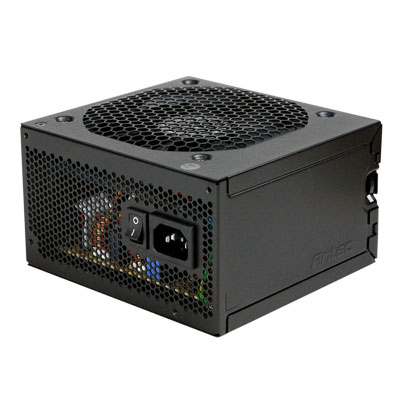 |
| Haven't had one of these die on me yet... |
If you are looking for a quick sale and want to get the box out the door and client is only concerned with price, sure put in an el-cheapo PSU in the box. However, if you want to keep this client happy and value their custom built computer at least set $50+ aside for a decent durable power supply. Some brands I recommend are http://www.antec.com/ and http://www.corsair.com/en/
Friday, 23 August 2013
Alternative to HideMyAss
Following on from my previous blog post about HideMyAss VPN I have also been testing another subscription based service which allows Australian devices to access region restricted content such as Netflix and Hulu.
It is called unblock-us it calls itself a VPN however it doesn't behave like a standard VPN. When you sign up for the unblock-us service you are given a username and password and a DNS address to put in the network settings for your device (usually within a home network DNS is obtained automatically by the router from the ISP). When you log into the unblock-us website with a username and password the system must add your WAN IP to the allowed IP's on the DNS server.
So these two steps give you access same as if you were on a standard VPN and you can access content region restricted from the US.
Why use unblock-us instead of HideMyAss?
When you use a service like HideMyAss the speed is slowed depending on the VPN server you connect to, with unblock-us you 'should' be able to maintain your internet connection speed without seeing a significant loss in speeds.
Why use HideMyAss instead of unblock-us?
 |
| This happens in Australia |
It is called unblock-us it calls itself a VPN however it doesn't behave like a standard VPN. When you sign up for the unblock-us service you are given a username and password and a DNS address to put in the network settings for your device (usually within a home network DNS is obtained automatically by the router from the ISP). When you log into the unblock-us website with a username and password the system must add your WAN IP to the allowed IP's on the DNS server.
So these two steps give you access same as if you were on a standard VPN and you can access content region restricted from the US.
Why use unblock-us instead of HideMyAss?
- Speed.
- Can be set up on any device which allows DNS settings to be configured. So devices without a VPN client, like a Nintendo 3DS, PS3, Xbox360, Wii etc can be used with it happily.
When you use a service like HideMyAss the speed is slowed depending on the VPN server you connect to, with unblock-us you 'should' be able to maintain your internet connection speed without seeing a significant loss in speeds.
Why use HideMyAss instead of unblock-us?
- Seeing as though unblock-us is not a standard VPN I would be hesitant to direct people to unblock-us if they are concerned with protecting their internet traffic. Your ISP can still see the information sent through to the DNS server at unblock-us's end so HMA is much better in this regard as traffic is protected at all points.
- If you want to be able to connect multiple devices to access region restricted content then I would be leaning towards HMA and configure as discussed. Unblock-us does not allow multiple simultaneous device connections on the one unblock-us subscription. For example if you had two iPad's wanting to access Netflix at the same time then you would need two unblock-us subscriptions.
- Flexibility, since HMA is a standard VPN there are ways you can use other hardware in order to segment and extend you VPN subscription in your home or work network as discussed last time. Lots of devices and appliances support VPN connections out of the box.
Monday, 28 January 2013
SSD cannot be detected
I have been a huge advocate of Solid State Drives (SSD), for my clients and my own computers I have been quick to jump on the bandwagon of putting an SSD in every computer I can.
Since they started being affordable back in 2010 - 2011 I have since upgraded multiple clients to these blistering fast components, as a way to ensure no bottlenecks in new computers and a way of resuscitating old ones. However, out of the multitude of installs performed I have had a few of these components fail usually after a restart of the computer or on boot.
If you see the error message above or similar and your computer has an SSD as the primary drive, your computer is pretty much screwed. The drive is probably not visible in BIOS, and if you manage to take the drive out and into another computer to double check, you will probably see the drive but it contains no data and is essentially inaccessible. So start digging around for the receipt or proof of purchase to check if it is warranty.
I have mainly been using OCZ, Patriot and Kingston SSD's and have had failures across all brands, I would assume the more expensive Intel produced SSD's will be of higher quality, but it is something to be wary of, in my experience a standard mechanical hard drive purchased today will be more reliable then a low to med quality SSD. In saying that SSD's definitely have their place, if you are going to use in an office environment where no user content is stored on the SSD then happy days, but I would not be storing family photos on one until I am convinced they have become as reliable as the mechanical brethren.
 |
| OCZ SSD |
Since they started being affordable back in 2010 - 2011 I have since upgraded multiple clients to these blistering fast components, as a way to ensure no bottlenecks in new computers and a way of resuscitating old ones. However, out of the multitude of installs performed I have had a few of these components fail usually after a restart of the computer or on boot.
 |
| Hopefully you do not see this as much as I have |
I have mainly been using OCZ, Patriot and Kingston SSD's and have had failures across all brands, I would assume the more expensive Intel produced SSD's will be of higher quality, but it is something to be wary of, in my experience a standard mechanical hard drive purchased today will be more reliable then a low to med quality SSD. In saying that SSD's definitely have their place, if you are going to use in an office environment where no user content is stored on the SSD then happy days, but I would not be storing family photos on one until I am convinced they have become as reliable as the mechanical brethren.
DD-WRT and Linksys E2000 awesomeness
Having recently found out the many benefits a VPN service provider adds to my internet connection I have signed up with a Pro VPN account from HideMyAss. Mainly for protecting my internet connection from potential snoops but has the added benefit of accessing content that could be IP region locked.
One of the main services I and many others want to access is Netflix, and this and other video services Hulu are not available services in Australia at this time.
With a VPN service like HideMyAss (HMA) you can simply connect to a server in the US and then services such as Netflix see your connection as a US connection so you can access the service just like you are in the US. Now when you sign up HMA they give you access to the HMA software which will create a connection for your Windows, Mac or Linux box. This software works great and has heaps of configurable options, but what if you want to connect a device through this VPN that does not have a VPN client configuration available. For example a PS3 or Nintendo 3DS.
This is where DD-WRT steps in, its essentially a custom firmware that is supported on a handful of routers which will allow your router to maintain the connection to HMA and share the secure VPN connection to any device on your network.
There are multiple routers which are supported by DD-WRT so I picked one and ordered the Linksys E2000 and attempted to set it up with DD-WRT. The setup was so simple, as the process was detailed on the DD-WRT Wiki including links to the latest firmware. The guys at DD-WRT really value documentation and have lots of information about the supported routers and how to install.
After downloading the firmware you just login to the standard E2000 interface then upgrade the firmware as you normally would. After that upon reboot of the router you will be running DD-WRT. This interface now gives you a plethora of options along with the ability to create the PPTP connection to a HMA VPN server with your HMA username and the PPTP password from HMA.
Since DD-WRT is a standard across routers that support it you can follow the guide to get it up and running. Once you have done it now all you have to do is hook up the PS3 to your new wireless router and your PS3 will think its in the US, so that means secured internet and access to Netflix. Not to mention a lot more control over your Linksys E2000 router.
One of the main services I and many others want to access is Netflix, and this and other video services Hulu are not available services in Australia at this time.
 |
| Region locking on US based services is all too familar for Australian internet users. |
This is where DD-WRT steps in, its essentially a custom firmware that is supported on a handful of routers which will allow your router to maintain the connection to HMA and share the secure VPN connection to any device on your network.
 |
| Cisco Linksys E2000 |
After downloading the firmware you just login to the standard E2000 interface then upgrade the firmware as you normally would. After that upon reboot of the router you will be running DD-WRT. This interface now gives you a plethora of options along with the ability to create the PPTP connection to a HMA VPN server with your HMA username and the PPTP password from HMA.
Since DD-WRT is a standard across routers that support it you can follow the guide to get it up and running. Once you have done it now all you have to do is hook up the PS3 to your new wireless router and your PS3 will think its in the US, so that means secured internet and access to Netflix. Not to mention a lot more control over your Linksys E2000 router.
 |
| Nice DD-WRT, nice work. |
Subscribe to:
Posts (Atom)